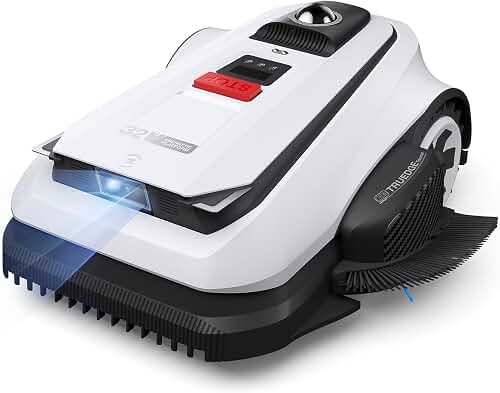
Setting up the Segway Navimow H800 on a corner lot is mostly a matter of placing the RTK reference antenna where it can see open sky, then walking the virtual boundary in a way that respects the unique geometry of two street-facing edges meeting at a right angle. A successful Segway Navimow H800 corner lot setup hinges on three things: (1) clear satellite reception above the antenna, (2) a perimeter path that pulls the boundary 15-20 cm inside hardscapes on both street sides, and (3) thoughtfully placed no-go zones around driveway aprons, mailbox posts, and the inside corner where the two street edges meet. Get those right and the H800 will handle the rest using its EFLS 2.0 GPS-plus-vision navigation, with no buried boundary wire required.
Why Corner Lots Are Different
A standard interior lot has one street-facing edge and three sides bordered by neighbors or fences. A corner lot doubles the exposed street frontage, which means two important things for any wire-free robot mower. First, the perimeter you map is dominated by long straight runs that often sit only inches from a public sidewalk or curb, so any GPS drift translates directly into either uncut strips or a mower wandering toward traffic. Second, the inside corner where the two street edges meet is the single most error-prone spot in the entire job. Trees, light poles, fire hydrants, and decorative landscaping tend to cluster there, and the H800 needs an unambiguous boundary line that threads between them.
The good news is that the Navimow H800 is specifically engineered for this kind of layout. Its VisionFence camera-based obstacle system, dual-antenna RTK receiver, and 2 cm positioning accuracy were all designed to keep the mower predictable on open, satellite-friendly geometry, which is exactly what corner lots provide once the trees are accounted for.
Step 1: Site Survey Before You Unbox
Before you cut the cardboard, walk the lot with a phone and take notes. You are looking for four things that will dictate where the charging dock and RTK antenna go.
- Open sky overhead. The RTK antenna needs an unobstructed view of at least 120 degrees of sky. Mature street trees on a corner lot are the most common source of degraded signal.
- A power source within reach. The dock needs an outdoor-rated 110 V outlet within roughly 30 feet, and the antenna cable that ships with the H800 is 10 m by default.
- A flat docking pad. Ideally a level patch of grass, mulch, or pavers at least 1.5 m wide and 2 m deep so the mower can approach and back out cleanly.
- Pinch points. Any spot narrower than 1.2 m where the mower has to pass between obstacles. These need to be widened or designated as channels in the app.
If your corner is dominated by a large oak or maple, plan to mount the RTK antenna on the roof eave of the house rather than on the included ground stake. The H800 supports a wall-mount accessory and a longer extension cable, and the elevation advantage is worth the effort on any tree-heavy lot.
Step 2: Position the Charging Dock
Place the dock along the longest, straightest edge of the lawn, ideally facing into the yard rather than toward the street. On a corner lot the temptation is to tuck the dock against the house in the inside corner, but this often forces the mower to navigate the most complex section of the perimeter on every return trip. Instead, mid-edge placement gives the mower a simple, predictable docking approach and keeps the dock visually discreet behind shrubs or a low hedge.
Anchor the dock with the supplied stakes and confirm it is level in both axes. A dock that tilts even five degrees can cause intermittent charging faults that look like firmware bugs but are really just a contact alignment problem.
Step 3: Mount and Calibrate the RTK Antenna
This is the single most important step of the Segway Navimow H800 corner lot setup. The antenna provides the centimeter-accurate position correction that the mower uses to stay inside your boundary, and a poor antenna location will undermine everything else you do.
Mount the antenna at least 1.5 m above the ground, with at least 2 m of horizontal clearance from any wall, chimney, or tree trunk. Roof-edge mounting is ideal on corner lots because it elevates the antenna above street-tree canopy. If you must use the ground stake, place it in the most open part of the lawn, not in the inside corner near landscaping.
Once mounted, open the Navimow app and run the satellite reception test. You want a green status with at least 20 satellites visible and a position fix labeled FIX (not FLOAT or SINGLE). If you see FLOAT for more than a minute, the antenna needs a better location before you proceed.
Step 4: Map the Perimeter
With the antenna locked in, pair the mower to the dock and start the perimeter-mapping wizard in the app. You will walk the mower manually using the app joystick, defining the outer boundary of the cuttable area.
For corner lots, follow these rules as you walk.
- Stay 15 cm inside hard edges. Sidewalks, driveways, and curbs are unforgiving. A 15 cm buffer prevents the cutting deck from striking concrete and gives the mower room to track the edge cleanly.
- Pull in to 20 cm on the street side. The extra 5 cm of buffer along public sidewalks compensates for any GPS jitter and keeps the mower well clear of pedestrians.
- Round the inside corner gently. Instead of walking a sharp 90-degree turn where the two street edges meet, trace a gentle arc with a roughly 1 m radius. The H800 navigates curves more reliably than sharp interior corners, and a small uncut wedge is easier to trim by hand than to fight the mower over.
- Walk slowly and steadily. The mapping system samples your position several times per second. Stopping mid-edge or jerking the joystick produces a jagged boundary that the mower will interpret literally.
When you reach your starting point, close the loop and save the map. The app will display the boundary as a polygon. Zoom in on the inside corner and the driveway apron to confirm there are no spikes or dropouts.
Step 5: Define No-Go Zones
Corner lots tend to have more obstacles than interior lots: street-side trees, mailbox posts, utility pedestals, decorative boulders, and irrigation control boxes. Each of these needs a no-go zone drawn around it in the app.
For trees, draw a circular no-go zone with a radius of 30 cm beyond the visible trunk flare to protect surface roots. For mailboxes and signposts, a 25 cm radius is sufficient. For utility pedestals, draw a rectangle that covers the full footprint plus 20 cm on all sides; these objects often have sharp metal flanges at ground level that can damage the mower deck.
Pay special attention to the inside corner. If a street tree, a fire hydrant, or a utility box sits within 2 m of where your two boundaries meet, the H800 needs to know about it explicitly. The combination of a tight inside corner and an unmapped obstacle is the most common cause of repeated mower-stuck alerts.
Step 6: Configure Channels and Passages
If your corner lot has a side yard connected to the front yard by a narrow strip beside the house, define that strip as a channel in the app. Channels tell the mower to drive through at a steady speed without attempting to mow in a serpentine pattern, which dramatically reduces wear on tight passages.
For deeper background on this kind of layout decision, our general robot lawn mower installation guide walks through channel and passage configuration in detail, and applies directly to the H800.
Step 7: First Test Run and Edge Tuning
Start with a single mowing session at a moderate cutting height (around 45 mm) and watch the first lap from the sidewalk. You are looking for three behaviors.
- The mower should track the boundary smoothly without zigzagging or hesitating.
- It should slow down and pivot at the inside corner, not stop and reverse repeatedly.
- It should leave a consistent uncut strip of roughly 10-15 cm along the boundary, which is normal and expected.
If you see the mower hesitating in the same spot on every lap, that is almost always a satellite-reception issue caused by a tree directly overhead at that point. The fix is either to elevate the antenna or to extend a no-go zone over the trouble spot so the mower routes around it.
Step 8: Schedule and Edge Mode
Corner lots benefit from running edge mode more often than interior lots because two of your four edges are exposed to public view. Schedule a dedicated edge pass once or twice a week in addition to the standard mowing schedule. The H800 will trace the perimeter at a slower speed with the deck offset slightly toward the boundary, which closes most of the uncut strip and produces the clean street-side appearance that corner lots are judged on.
If you are still deciding between the H800 and other wire-free models, our guide to the best wire-free robot lawn mowers compares positioning systems, obstacle avoidance, and corner-lot suitability across the current generation.
Troubleshooting Common Corner-Lot Issues
Three problems show up repeatedly in corner-lot installations, and all three have straightforward fixes.
Mower drifts toward the sidewalk. This is almost always a FLOAT fix during the mapping walk. Re-map the perimeter on a day with clear sky and confirm FIX status throughout. If the problem persists, increase your boundary buffer from 15 cm to 20 cm.
Mower repeatedly stops in the inside corner. Either an obstacle is unmapped or the corner geometry is too tight. Add a no-go zone or soften the corner with a 1 m arc.
Mower fails to dock. Check that the dock is level and that there is no metallic object within 1 m that could interfere with the docking beacon. Sprinkler control boxes and metal landscape edging are common culprits.
For a broader catalog of fixes, our robot lawn mower troubleshooting guide covers issues that span brands and platforms.
Frequently Asked Questions
How long does Segway Navimow H800 corner lot setup actually take?
Expect two to three hours from unboxing to first successful mow on a typical quarter-acre corner lot. The antenna mounting and perimeter walk are the two longest steps, each taking roughly 30-45 minutes. No-go zones and scheduling add another 30 minutes. Plan for a calm, sunny day so satellite reception is at its best during the initial mapping.
Can the Navimow H800 mow right up to a curb on a corner lot?
No robot mower can safely cut flush to a hard edge because the cutting deck is inset from the wheelbase by several centimeters. The H800 will leave a 10-15 cm uncut strip along curbs and sidewalks, which is normal. Edge mode reduces this strip but does not eliminate it. Plan to trim the boundary by hand once every two or three weeks.
Do I need to bury anything for the Segway Navimow H800?
No. The H800 is fully wire-free and uses RTK satellite positioning combined with a vision system for obstacle detection. The only physical install is the charging dock, the RTK antenna mount, and a single low-voltage cable between the two. Nothing needs to be buried, trenched, or stapled into the lawn.
What happens if a delivery truck blocks my RTK antenna view?
Brief occlusions of a few seconds are handled by the H800's inertial dead-reckoning and vision systems. Longer occlusions cause the mower to pause and wait for signal to return. On corner lots near busy streets this can happen a few times a week and is not a malfunction. If pauses become frequent, raise the antenna higher to clear vehicle sight lines.
How does the H800 handle a sloped corner lot?
The H800 is rated for slopes up to 45 percent (about 24 degrees). Most residential corner lots are well within that limit. The bigger consideration on sloped lots is drainage and traction during wet weather; schedule mowing for mid-morning when dew has burned off but before afternoon irrigation cycles run.
Can I mow the parkway strip between the sidewalk and curb?
Only if it is connected to the main lawn by a passage at least 60 cm wide. Most parkway strips are physically isolated by sidewalks and have to be mowed separately by hand or by a second mower. If your local code permits and the strip is wide enough, you can create a separate map zone for it on the H800, but you will need to manually carry the mower across the sidewalk to start each session.
Is the H800 worth it compared to a smaller Navimow model on a corner lot?
The H800 is sized for lawns up to roughly 4,000 square meters, which is far larger than most residential corner lots. If your corner lot is under 1,000 square meters, the smaller i105 may be a better fit. Our Segway Navimow i105 review covers that model in detail and can help you decide whether the H800's extra capacity is justified for your specific lot.