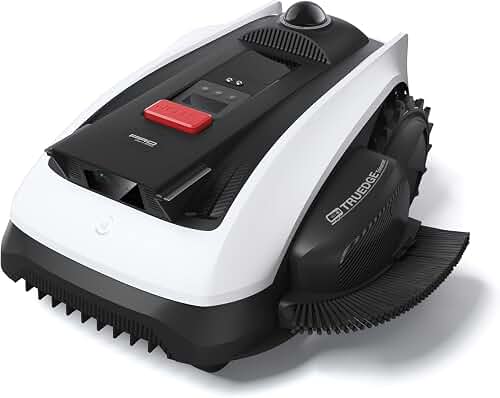
The mammotion luba 2 awd setup koi pond perimeter process centers on RTK-mapped virtual boundaries, a generous safety buffer, and tested no-go zones before you ever let the AWD chassis run autonomously. Map the koi pond as a permanent exclusion polygon at least 1.5 to 2 feet outside the visible water edge, account for overhanging lily pads or bog plants, and verify your RTK fix is "FIXED" (centimeter-grade) rather than "FLOAT" before the first cut. The Luba 2 AWD's wire-free, vision-plus-RTK design makes water features manageable, but pond-side terrain demands deliberate mapping, conservative slope handling, and a rescue plan you actually test on a calm afternoon.
Why Koi Ponds Demand a Different Mapping Approach
Koi ponds are not like garden beds, decorative gravel, or even chlorinated swimming pools. They combine three properties that magnify the cost of a single navigation error: an irreplaceable living population, soft or sloping waterline geometry that often lacks a hard physical barrier, and ecological sensitivity to lubricants, plastic debris, and battery chemistry. A robot mower entering a koi pond is not a "fish out, mower out" recovery — it can be a contamination event that stresses or kills fish for weeks afterward.
The Mammotion Luba 2 AWD is one of the more capable wire-free mowers on the market for tricky perimeters because it pairs RTK-GPS positioning with visual obstacle detection and an all-wheel-drive chassis that holds traction on damp pond-side grass. None of those advantages, however, substitute for a carefully drawn boundary that you have walked, saved, and verified at the actual waterline.
Pre-Setup: Survey the Pond and Surrounding Zone
Before you open the Mammotion app, walk the pond perimeter at the time of day you expect to mow. Note:
- The actual waterline at maximum pond level (after heavy rain, not summer drawdown).
- Any "soft edge" zones — bog filters, marginal plant shelves, hidden lily-pad spread.
- Stone coping that may overhang water, which can fool ground sensors into reading solid lawn above the void.
- Slope angles within six feet of the water. The Luba 2 AWD handles steep grades, but pond-side margins deserve a conservative treatment.
- Power cords for pumps, aerators, or UV clarifiers that may cross the lawn.
Mark these features physically with garden flags or chalked rope. This temporary marking becomes your reference during the digital mapping walk.
Step 1: Position the RTK Reference Station Correctly
The Luba 2 AWD's positional accuracy depends on a clean RTK datalink between the dock-mounted antenna and the mower. Pond areas frequently fail mapping not because of the water itself but because of nearby obstructions: pergolas, mature trees over the pond, tall fountains, or stone walls that block the antenna's sky view.
Mount the RTK reference station with an unobstructed sky view of at least 30 degrees above the horizon in every direction. Do not mount it on a pergola, gazebo, or trellis adjacent to the pond — those structures will eventually grow vine cover or hold seasonal decorations that degrade the signal. If the only viable mount creates partial occlusion over the pond zone, install the optional pole extension or relocate the dock.
Run the app's RTK signal-strength diagnostic while standing at each of the four cardinal points around the pond. You need a stable FIXED solution at every point. A FLOAT solution at the pond edge guarantees boundary drift, and boundary drift around water is the single biggest cause of robot-mower water incidents.
Step 2: Map the Main Lawn Working Area First
Always map the main working perimeter before you draw exclusion zones. Walking the outer lawn first lets the system calibrate odometry and IMU against RTK and produces a cleaner base map. Push the Luba 2 AWD in manual mode around the outer property line at a consistent walking pace, keeping the mower aligned with the edge.
Once the outer perimeter is closed and saved, the pond exclusion becomes much easier to position accurately relative to known lawn edges.
Step 3: Drawing the Koi Pond No-Go Zone
This is the core of the mammotion luba 2 awd setup koi pond perimeter task. In the Mammotion app, select "No-Go Zone" (sometimes labeled "Forbidden Area" depending on firmware revision).
Manual walking method (recommended for ponds):
- Drive the mower in manual mode along your chalked rope offset 1.5 to 2 feet outside the maximum waterline.
- Close the polygon by returning to the starting point.
- Save and name it clearly — for example, "Koi Pond — North" or "Main Pond Exclusion."
Polygon-drawing method (on-screen):
- Use the satellite overlay view if your firmware supports it.
- Draw a polygon at least 24 inches outside the visible water edge.
- Add extra buffer on the downslope side of the pond.
Always prefer the manual walking method for water hazards. RTK-walked boundaries inherit the centimeter-grade accuracy of the live position fix; on-screen polygons inherit satellite imagery error, which can drift by one to three meters and is silently rebased between map providers.
Step 4: Add a Secondary "Approach Buffer"
A single no-go zone is not enough for water. Add a second, larger virtual boundary as a slow-zone or secondary exclusion to handle three failure modes: transient RTK glitches, sudden weather changes that wet the grass mid-cycle, and obstacle-avoidance overshoot when the mower swerves around a stick or stray ball.
Some firmware revisions support a dedicated "buffer zone" that mows at reduced speed. If yours does not, simply draw a slightly larger no-go ring around the primary exclusion and disable mowing inside; the AWD will treat both as exclusion polygons and refuse to enter either.
Step 5: Handle Pond-Side Slopes Carefully
The Luba 2 AWD's all-wheel-drive system is its headline differentiator, and it does handle steep grass well. But "can handle a slope" and "should be allowed on a slope dropping into koi water" are different questions. For any pond-side incline greater than 15 degrees, expand the no-go offset to three feet or more, and prefer mowing perpendicular to the slope rather than running down toward the water.
Wet grass after rain or heavy dew reduces traction even on AWD platforms. Use the app's weather-skip feature, or manually pause scheduled cuts after rainfall until the surface dries.
Step 6: Protect Pond Equipment Cables
Pump cables, aerator lines, and UV clarifier cords are a real risk near the pond. Even if the mower body cannot fall in, a chewed power cable can — and a shorted UV unit means weeks of clouded water and stressed fish. Lift cords entirely off the lawn: run them inside conduit, route them along hardscape, or bury them at least six inches deep. If none of those options is possible, draw additional no-go strips covering their full path.
Step 7: Test in Daylight, On Foot
The first three or four cuts after defining a pond boundary should be supervised. Stand at the pond edge while the mower works the surrounding lawn. Watch for:
- Path lines that drift toward the water rather than tracking parallel to the boundary.
- Hesitation or "searching" behavior near the boundary, which often signals RTK degradation.
- RTK status drops from FIXED to FLOAT in the live telemetry view.
If you see drift, re-walk the boundary rather than nudging the on-screen polygon. RTK-walked corrections are always more reliable than dragging vertices on a satellite tile.
Step 8: Schedule Smart, Not Often
Frequent short mowing sessions produce better lawn health than long weekly sessions, but near a koi pond you should schedule cuts only during daylight, and ideally when you are home. Avoid early-morning cuts when dew is heaviest, and never schedule overnight runs adjacent to water features. The risk-to-reward ratio of an unattended 4 a.m. cycle near valuable koi simply does not balance.
Common Pond-Side Setup Mistakes
- Drawing the exclusion zone on satellite imagery only without walking it physically.
- Setting the buffer too narrow — anything under 18 inches.
- Trusting AWD traction to compensate for unsafe slope mapping.
- Mounting the RTK antenna where pond-area trees will leaf out in spring.
- Forgetting to re-walk the boundary after pond renovation or seasonal water-level change.
- Skipping the secondary buffer zone "because the first one is enough."
For additional context on general boundary setup beyond water features, see our complete robot lawn mower installation guide, and review how to prepare your lawn for a robot mower before the first run.
What If You Are Still Evaluating the Luba 2 AWD?
If you are still evaluating wire-free mowers for a property that includes a koi pond or other water feature, prioritize four characteristics: RTK-grade positioning, manual-walked boundary support, configurable no-go buffer width, and AWD or true 4WD traction for damp pond-side terrain. Compare your options in our roundup of the best wire-free robot lawn mowers for 2026, and for larger properties with multiple water features see the best robot mowers for large yards.
Ongoing Maintenance Around Water Features
A complete mammotion luba 2 awd setup koi pond perimeter is not a one-time event. Re-walk your pond boundary at least twice a year — once in spring after frost heave can shift dock and antenna positions, and again in late summer after seasonal plant growth changes the visual edge of the pond. After any pond liner replacement, marginal-shelf rebuild, or stone-coping repair, re-walk the boundary even if the visible change looks small. RTK-grade positioning will faithfully follow whatever boundary you saved last; it has no idea your pond got bigger.
Inspect the mower body weekly for grass clippings near the wheels and underside that may have picked up pond pollen, algae, or duckweed. These are harmless to the lawn but can mat the chassis vents if allowed to accumulate over a season.
Frequently Asked Questions
How close can the Mammotion Luba 2 AWD safely mow to a koi pond?
With a manually walked no-go boundary and a stable RTK FIXED fix, the Luba 2 AWD can mow as close as 12 inches from the water's edge on level ground. The safer working number is 18 to 24 inches, increased to 36 inches on any slope or soft edge. The few inches of unmowed margin can be trimmed by hand or with a string trimmer once a month — that small chore is a fair trade for irreplaceable koi.
Will the Mammotion Luba 2 AWD detect a koi pond as an obstacle on its own?
Partially. The Luba 2 AWD uses visual obstacle detection and ultrasonic sensors that recognize hard vertical edges, but open water without raised coping reads as low-contrast ground in some lighting. Do not rely on real-time detection for water features — always pre-map a no-go zone and treat onboard vision as a second line of defense rather than the primary one.
What happens to RTK accuracy if my pond is near tall trees?
Tall, dense canopy near the pond can degrade RTK from FIXED to FLOAT, causing boundary drift of 30 centimeters or more. Move the RTK reference antenna to a clearer sky-view position, raise it on the optional pole, or in severe cases install a second base station closer to the pond zone. Verify FIXED status at every pond-side cardinal point before saving the boundary.
Can I let the Luba 2 AWD mow near my pond at night?
No. Visual obstacle detection underperforms in low light, dew reduces traction on pond-side slopes, and you cannot supervise rescue if something goes wrong. Schedule mowing for daylight hours only when working near water features, and disable any "rain-or-shine" overnight schedules in the pond zone.
What should I do if the mower gets stuck near the pond?
Pause the mower from the app rather than running to it — sudden user motion can confuse vision-assisted positioning. Walk slowly to the mower, lift it back onto safe lawn, then re-walk the boundary if it appears the no-go zone failed. Never attempt manual rescue if the mower is partially in the water; cut power at the dock first, then retrieve.
Does AWD make the Luba 2 safer near water than a 2WD robot mower?
AWD improves traction on damp pond-side grass and reduces wheel slip on slopes, which lowers the chance of the mower sliding into a feature. Traction does not replace a correctly mapped no-go zone — AWD is a margin of safety on top of good mapping, not a substitute for it. Treat the boundary as primary, AWD as secondary.
How often should I re-verify the pond boundary?
Re-walk the boundary at the start of every mowing season, after any pond construction or repair, after the RTK base station has been moved or serviced, and any time you observe the mower behaving differently near the water. For more general edge-case behavior covering navigation glitches and recovery procedures, our robot lawn mower troubleshooting guide walks through the most common symptoms. Treat boundary verification as routine maintenance, not a one-time setup.